
The Lone C++ Coder's Blog

The Lone C++ Coder's Blog

The continued diary of an experienced C++ programmer. Thoughts on C++ and other languages I play with, Emacs, functional, non functional and sometimes non-functioning programming.

Timo Geusch

2-Minute Read

I’ve been using Samba with the time machine setting for years to back up the couple of Macs I own. I’ve recently been running into issues with Time Machine backups erroring out with "The network backup disk does not support the required capabilities". Poking around the Internet didn’t really point at an obvious culprit until I found some mumblings about this potentially begin a disk space issue.

Bingo!

While the Samba server had more than enough disk space left, I had set the maximum Time Machine volume size to 3.5TB using the setting fruit:time machine max size = 3.5T. Bumping this up to 4.5T magically made Time Maching backups work immediatly.
Timo Geusch

1-Minute Read

In the time honored tradition of using one’s blog as an Internet-enabled notepad, here’s a quick not on how I build GNU Emacs on macOS using homebrew and the emacs-mac port cask:

brew upgrade -s railwaycat/emacsmacport/emacs-mac --with-mac-metal --with-imagemagick --with-native-comp --with-modern-icon --with-natural-title-bar

This - amongst other features - turns on some experimental macOS-relevant features and most importantly, the optional native compilation of Elisp code.

Timo Geusch

8-Minute Read

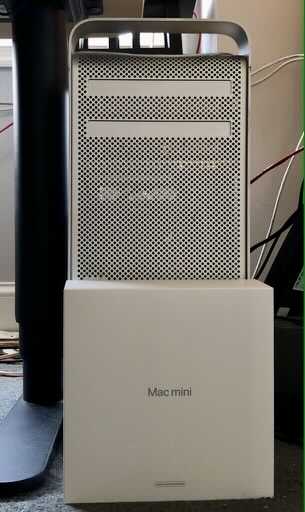
I’ve been using a 2009 cheesegrater Mac Pro for quite a while now. I bought it used quite a while ago - around 2013 if I remember correctly - and it’s been serving as my main photo/video/general programming workhorse, although the latter tasks have been taken over mostly by a Linux machine housed in the infamous NZXT H1 case. It’s been upgraded a lot during its life - now has the latest 6 core Xeon these machines support including the upgrade to 2010 firmware, USB 3.0 ports, PCIe SATA cards to get SATA-3 and a PCIe NVMe card, plus a Mac-flashed AMD RX580. Nevertheless, it was showing more and more signs of getting long in tooth. Plus some of the software that I’m using really would like to use macOS 10.15, which this Mac Pro doesn’t support unless I effectively turn it into a Hackintosh. Combine that with distinct signs of the machine getting geriatric and I decided that I was time for a replacement. But what?

Timo Geusch

3-Minute Read

I have a few more loose ends to tidy up before switching to the static version of the blog. One of the important tasks was to make sure I had a spell checker available. Back in the dim and distant past I had set up flyspell-mode with hunspell, but I wanted to check if there was something better available these days. Enter enchant, which acts as a front end to multiple, different spell checkers. I like that Emacs has included support for enchant since version 26, plus one of the backends enchant supports is AppleSpell. In other words, when running on macOS, flyspell can make use of the OS’s built in spell checker and dictionaries.

Instructions on how to actually set up enchant on macOS are a bit thin on the ground, so I decided that I’ll put together a quick write up.

Recent Posts

Categories

About

A developer's journey. Still trying to figure out this software thing after several decades.