
The Lone C++ Coder's Blog

The Lone C++ Coder's Blog

The continued diary of an experienced C++ programmer. Thoughts on C++ and other languages I play with, Emacs, functional, non functional and sometimes non-functioning programming.

Timo Geusch

1-Minute Read

I was profiling some code a while ago that makes extensive use of boost::variant and one of the lessons from the profiler run was that boost variants appear to be fairly expensive to construct and copy.

As of 1.53, variants support rvalue constructors and rvalue assignment operators. My initial measurements suggest that when used with types that are “move enabled”, there is a benefit in upgrading to this version of boost variant, both in performance and memory consumption.
Timo Geusch

2-Minute Read

I was trying to make Windows a little more Emacs-friendly (or was it the other way around?). First step was to enable the emacs server in my .emacs so I could make use of Emacs for quick and dirty editing tasks that require an editor better than Notepad but where the average Emacs startup time was just a little too long to make Emacs a viable alternative. A typical example would be to use Emacs as the editor for commit messages in Mercurial. A quick tweak of my global .hgrc provided me with an appropriate editor setting:

Timo Geusch

1-Minute Read

Happy New Year to all readers.

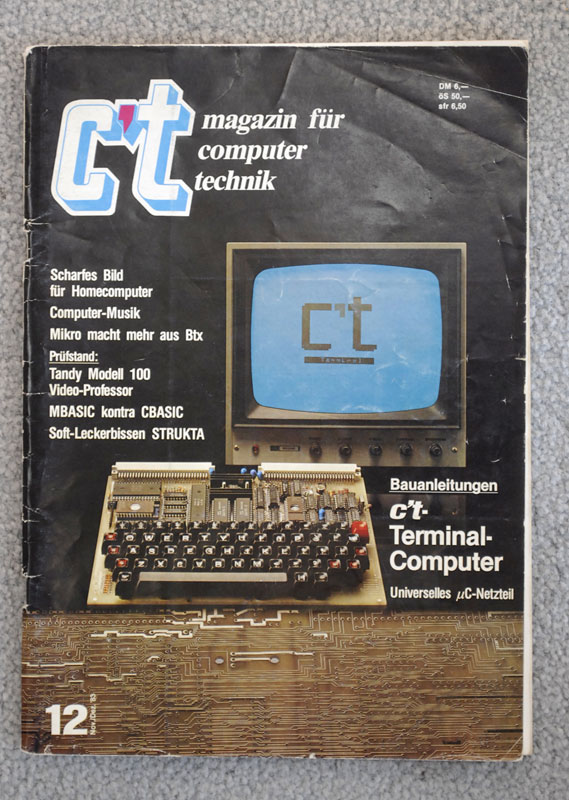
I’ve been blogging even less recently as we’ve just moved house but unpacking all the boxes meant that I came across one of my favourite magazines:

c't-erstausgabe

German readers of this blog (if are there any) might recognise the magazine - it’s the first issue of “c’t”, a magazine that is still going on strong almost thirty years later. The issue above is dated November/December 1983 and has moved house (and continents) with me a fair number of times.

Timo Geusch

3-Minute Read

Long title, I know…

I was trying to get Windows RT’s Mail App to access the email on my own server. The server uses IMAPS with s self-signed certificate as I only want SSL for it encryption and don’t really need it for authentication purposes as well. As long as it is the correct self-signed certificate I’m happy.

The Mail app however rejects certificates that weren’t signed by a trusted authority and doesn’t offer an obvious exception mechanism (like Thunderbird or Apple Mail) that circumvents the need for a trusted certificate. The original Mail app that came with my surface also displays only a very cryptic error messages, but the latest update from earlier this week correctly suggests that one needs to add the self-signed certificate to the certificate storage in order to get Mail to recognize the certificate.

Timo Geusch

5-Minute Read

There, I’ve said it. No tiptoeing around.

As a senior developer/team lead, I get involved in hiring new team members and in certain cases also help out other teams with interviewing people. As part of the interview process, candidates are usually asked to write code, so I review a lot of code submissions. One trend I noticed with recent C++ code submissions is that the first like I encounter in any header file is

Timo Geusch

2-Minute Read

Last night I did something I was adamant I wasn’t going to do, namely rooting my Android phone and installing CyanogenMod on it. Normally I don’t like messing with (smart)phones - they’re tools in the pipe wrench sense to me, they should hopefully not require much in the way of care & feeding apart from charging and the odd app or OS update. Of course, the odd OS update is can already be a problem as no official updates have been available for this phone (a Motorola Droid) for a while and between the provider-installed bloatware that couldn’t be uninstalled and the usual cruft that seems to accumulate on computers over time, the phone was really sluggish, often unresponsive and pretty much permanently complained about running out of memory. So far it appears that updating the OS and only installing a handful of apps that I actually use as opposed to the ones that I supposedly “need” has resulted in a much better user experience.

Timo Geusch

5-Minute Read

I generally don’t post that much about the tools I use as they’re pretty standard fare and most of the time, your success as a programmer depends more on your skills than on your tools. Mastery of your tools will make you a better software engineer, but if you put the tools first, you end up with the cart before the horse.

I guess people have noticed that I use Emacs a lot :). My use of it is mainly for writing and editing code (and some newsgroup reading at home using Gnus) and I generally use it only for longer coding sessions. As a lot of my work is on Windows, one of the main tools I use is Visual Studio - almost exclusively 2010 right now, although I’ve taken a few peeks at 2012 and have used pretty much every version since VC++ 4. While I tend to use Emacs as soon as I’m editing more than two lines I tend to make the small changes that you get to make while debugging in Visual Studio.

Timo Geusch

1-Minute Read

… make sure that you have removed all dependencies on the project that you are about to remove before you remove the project from the solution.

If you don’t, the projects that still have dependencies on the project you just removed will retain the dependencies, but the dependencies will have become invisible and the only way to rid yourself of the “phantom dependencies” is by editing the actual vxcproj files with a text editor and remove the dependency entry in there manually.

Timo Geusch

5-Minute Read

There is a lot that modern IDEs do well, but uncluttered writing space isn’t one of them. Once you add the various views of your project, the debug window, the source control window and various other important panes you’re left with a tiny viewport into your code. The visual clutter can be disabled of course, but you’ll get it back sooner or later. When you switch back to debug mode or build mode, for example.

Recent Posts

Categories

About

A developer's journey. Still trying to figure out this software thing after several decades.