
The Lone C++ Coder's Blog

The Lone C++ Coder's Blog

The continued diary of an experienced C++ programmer. Thoughts on C++ and other languages I play with, Emacs, functional, non functional and sometimes non-functioning programming.

Timo Geusch

2-Minute Read

These are just a couple of notes for some neat tips and tricks I’ve discovered over the years when using Boost.Test. They may not be all that useful to everybody else but they’re the ones I tend to forget about and then end up rediscovering. I’m using most of these with recent versions of Boost and these were tested with 1.54.

  • You can nest test suites. I don’t use this feature and was surprised to discover it, but it makes a lot of sense if you’re dealing with large test suites that can be easily broken down into smaller logical chunks.
  • If you arrange the tests in test suites (which you should anyway), you can run a single test suite by using -run_test=TestSuite. You can also run a single test inside a test suit or a nested suit by giving the appropriate path to -run_test, like so -run_test=TestSuite/TestName
  • Fixtures are normal C++ structs/classes so you can derive from them to create more specialized fixtures. For example, in a set of test suite used to test a fairly large set of COM APIs, I use a single fixture to initialize COM, then derive fixtures to set up the tests for each interface. This cuts down a lot on duplicated initialization code.
  • Boost.Test supports fixtures. Make lots of use of them to set up the environment for each of your tests instead of dumping a lot of the initialization code into each test case, which makes the test cases smaller, easier to read and you can follow the “let the first call in your test be the function you’re testing” mantra.
  • Members of the fixtures can be used directly in your unit tests
  • You can use BOOST_CHECK/BOOST_REQUIRE macros in the fixtures as well, although I would advise to make fairly minimal use of that. It does help if you are trying to test what I call “flaky” pieces of code.

Timo Geusch

1-Minute Read

Quick hack/warning for those using an alternative command line processor like TCC and also use Xoreax’ Incredibuild for distributed builds. Incredibuild is awesome, by the way, and if you have a larger C++ project that takes a long time to build, you should use it. And no, I’m not getting paid or receive free stuff for writing that.

However, if you have to start your Visual Studio instance from the command line because you need to set some environment variables first, or because of your general awesomeness, make sure you’re starting it from a stock Windows shell. Either the standard Windows command line (cmd.exe) or PowerShell will do nicely, thank you. If you start VS from TCC and have a couple of build tasks that spawn out to the shell, Incredibuild wants to shell out into TCC to run these tasks and the shelled out task don’t seem to return control to Incredibuild again. Yes, I was too lazy to investigate further as the method described above works.

Timo Geusch

2-Minute Read

If you, like me tend to carry around or “cloud around” a single .emacs file so you end up with similar environments wherever you have an Emacs install, you know it’s a little painful to ensure that you have the same set of basic packages installed on each one of your Emacs installations. As I had mentioned before I don’t use that many third party packages so my Emacs configurations aren’t that complicated, but I always prefer to have the computer remember things so I don’t have to.

Timo Geusch

1-Minute Read

A common annoyance with Emacs when working on a code base that has duplicate file names is that the mode line tends to display the buffer names as “one.py:<1>”, “one.py:<2>” etc etc. That doesn’t help much with telling them apart and I find it confusing.

I was introduced to the Uniquify library a while ago. This library allows you some control over how you want to display the buffer names of buffers that contain files with duplicate names. I use the following configuration in my .emacs:

Timo Geusch

2-Minute Read

A couple of interesting articles about debugging. Debugging doesn’t seem to get a lot of attention when people are taught about programming, I assume you’re supposed to acquire this skill by osmosis, but it is actually one of those skills that should receive much greater attention because it’s one of those that separates highly productive developers from, well, not so productive ones.

Why I’m Productive in Clojure. I’ve long been a fan of Lisp and Lisp-like languages, even though I wasn’t originally that happy with having Lisp inflicted on me when I was at university. Because it was weird and back then I didn’t much appreciate non-mainstream languages. These days I do because that’s where you usually find better expressiveness and ideas supposedly too strange for mainstream languages. I guess that makes me a language hipster.

Timo Geusch

2-Minute Read

Putting the OpenSprinkler and Raspberry Pi together was easy, getting them to run showed my inexperience when it comes to playing with hardware. The overall install went pretty smoothly and the documentation is good and easy to follow so I’m not going to ramble on about it for very long, but just throw up some notes.

First, my old card reader didn’t want to play with any of my computers. Now, the card reader is ancient, but should have been able to work with an SD card. No joy under and available OK, so I ended up having to get a new SD/microSD only card reader.

Timo Geusch

1-Minute Read

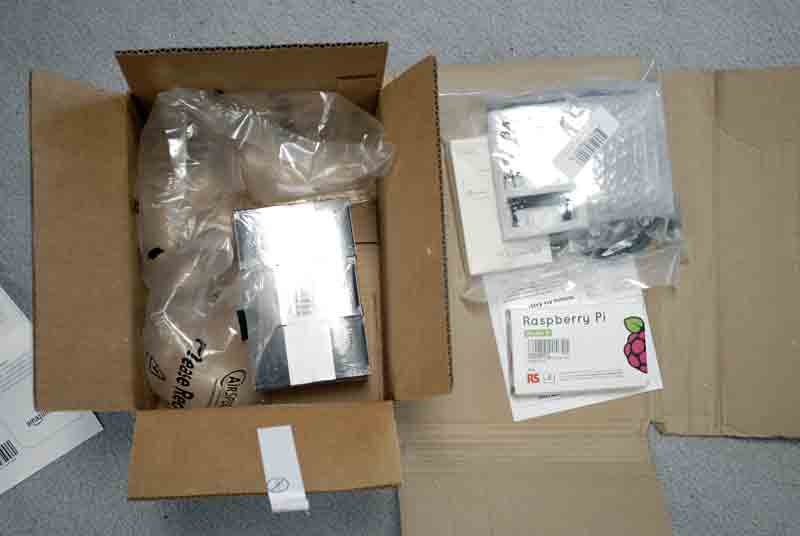
The Raspberry Pis have landed. Guess which box contains the sensitive electronics and is worth about twice as much as the other one:

That’s right:

Geez Amazon, what is it about the shoddy packing when it comes to items that are bought via Amazon Fulfillment Services? This is not the first time I got something that can only be described as badly packaged.

The OpenSprinkler kit has also arrived, all I’m currently waiting for is a smaller memory card as the regular SD cards I bought are a little to big to fit into the OpenSprinkler case. Anyway, I should have the new hardware up and running on Friday.

Timo Geusch

3-Minute Read

I normally don’t play much with hardware, mainly because there isn’t/wasn’t much I want to do that tends to require hardware that’s not a regular PC or maybe a phone or tablet. This one is different, because no self-respecting geek would want the usual rotary control “programmable” timer to run their sprinkler system, would they?

We do live at the edge of the desert and we have pretty strict watering restrictions here. I’m all for it - water being a finite resource and all that - and I want to improve our existing sprinkler system at the same time. It doesn’t help that the people who set up the sprinklers were probably among the lower bidders, to put it politely. OK, to be blunt they seem to have failed the “giving a shit” test when they put the system together. I’ve spent a lot of  last year’s “gardening hours” just trying to make it work somewhat. Not well, just “somewhat”. Time to fix that.

Timo Geusch

3-Minute Read

OK, I admit it - I’m a dinosaur. I still use the command line a lot as I’m subscribing to the belief that I can often type faster than I can move my hand off the keyboard to the mouse, click, and move my hand back. Plus, I grew up in an era when the command line was what you got when you turned on the computer, and Windows 2.0 or GEM was a big improvement.

Recent Posts

Categories

About

A developer's journey. Still trying to figure out this software thing after several decades.