
The Lone C++ Coder's Blog

The Lone C++ Coder's Blog

The continued diary of an experienced C++ programmer. Thoughts on C++ and other languages I play with, Emacs, functional, non functional and sometimes non-functioning programming.

Timo Geusch

2-Minute Read

My adventures with Manjaro Linux continue and I’ve even moved my “craptop” - a somewhat ancient Lenovo X240 that I use as a semi-disposable travel laptop - from XUbuntu to Manjaro Linux. But that’s a subject for another blog post. Today, I wanted to write about package download performance issues I started encountering on my desktop recently and how I managed to fix them.

I was trying to install terminator this morning and kept getting errors from Pamac that the downloads timed out. Looking at the detailed output, I noticed it was trying to download the packages from a server in South Africa, which isn’t exactly in my neighbourhood. Pamac doesn’t appear to have an obvious way to update the mirror list like the Ubuntu flavours do, but a quick dive into the command line helped me fix the issue.

Timo Geusch

1-Minute Read

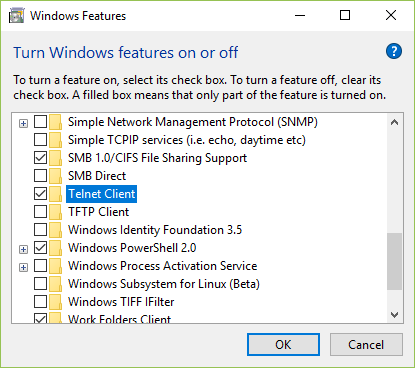
Turns out it’s not only Windows 8 that has its telnet client disabled, Windows 10 is in the same boat. I’ve been using Windows 10 for quite a while now and just discovered this issue. Anyway, the way to enable is as follows:

  • Right click on the start button
  • Select “Programs and Features”
  • “Turn Windows features On or Off”
  • Select ‘Telnet client’ in the dialog box that appears, like here:

Job done.

Timo Geusch

4-Minute Read

I’ve been a Xubuntu user for years after switching from OpenSuse. I liked its simplicity and the fact that it just worked out of the box, but I was getting more and more disappointed with Ubuntu packages being out of date, sorry, stable. Having to rebuild a bunch of packages on every install was getting a little old. Well, they did provide material for all those “build XXX on Ubuntu” posts. Recently I’ve been playing with Manjaro Linux in a VM as I had been looking for an Arch Linux based distribution that gave me the right balance between DIY and convenience. I ended up liking it so much that I did a proper bare metal install on my main desktop. The install was pretty smooth apart from a issue with getting my AMD RX 470 graphics card to work.

Timo Geusch

2-Minute Read

This blog is self-hosted, together with some other services on a FreeBSD virtual server over at RootBSD. Yes, I’m one of those weirdos who hosts their own servers - even if they’re virtual - instead of just using free or buying services.

I recently had to migrate from the old server instance I’ve been using since 2010 to a new, shiny FreeBSD 10 server. That prompted a review of various packages I use via the FreeBSD ports collection and most importantly, resulted in a decision to upgrade from PHP 5.6 to PHP 7.0 “while we’re in there”.

Timo Geusch

1-Minute Read

I’ve moved from using Apache as a web server to nginx for various projects. The machines I’m running these projects on are a somewhat resource constrained and nginx deals with low resource machines much better than Apache does and tends to serve content faster in those circumstances. For example switching the machine that hosts this WordPress blog from Apache and mod_php to nginx with php-fpm improved the pingdom load times on this blog by about 30% with no other changes.

Timo Geusch

1-Minute Read

Yes, I know Ubuntu and Xubuntu already come with Chromium in their official package repositories, but sometimes it does help to have the official/commercial version installed in addition to the Open Source one. I actually both installed right now, plus Firefox and Vivaldi. You could almost think I’m some sort of web developer or something.

The Google Chrome installation instructions for 14.04 on Ubuntu Portal also work fine for 15.04 with one wrinkle. If you use the installation via PPA method, you need to run the following command to actually install the stable version of Chrome:

Timo Geusch

4-Minute Read

In a previous blog post I explained how you can substantially improve the performance of git on Windows updating the underlying SSH implementation. This performance improvement is very worthwhile in a standard Unix-style git setup where access to the git repository is done using ssh as the transport layer. For a regular development workstation, this update works fine as long as you keep remembering that you need to check and possibly update the ssh binaries after every git update.

Timo Geusch

1-Minute Read

If you haven’t heard about the bash “shellshock” bug yet, it may be time to peek out from underneath the rock you’ve been under ;). While bash isn’t installed as standard on FreeBSD, there’s a very good chance that someone either installed it because it’s their preferred shell or because one of the ports lists it as a dependency. Either way, now would be a really good time to check if your machine has bash installed if you haven’t done so already. Go on, I’ll wait.

Timo Geusch

3-Minute Read

Long title, I know…

I was trying to get Windows RT’s Mail App to access the email on my own server. The server uses IMAPS with s self-signed certificate as I only want SSL for it encryption and don’t really need it for authentication purposes as well. As long as it is the correct self-signed certificate I’m happy.

The Mail app however rejects certificates that weren’t signed by a trusted authority and doesn’t offer an obvious exception mechanism (like Thunderbird or Apple Mail) that circumvents the need for a trusted certificate. The original Mail app that came with my surface also displays only a very cryptic error messages, but the latest update from earlier this week correctly suggests that one needs to add the self-signed certificate to the certificate storage in order to get Mail to recognize the certificate.

Recent Posts

Categories

About

A developer's journey. Still trying to figure out this software thing after several decades.